Standing Desks for Walking Pads
Walking pads are getting taller, and most desks can't keep up. The latest electric and manual pads sit 6-8" off the ground, meaning your desk surface needs to reach 49"+ for proper ergonomics. Here's which standing desks actually go high enough, plus monitor arm and setup advice.
Compare every walking pad we track - Vitalwalk, Jogwell, SB Fitness Equipment, Office Walker, Walkolution, and more - on price, motor, warranty and noise.
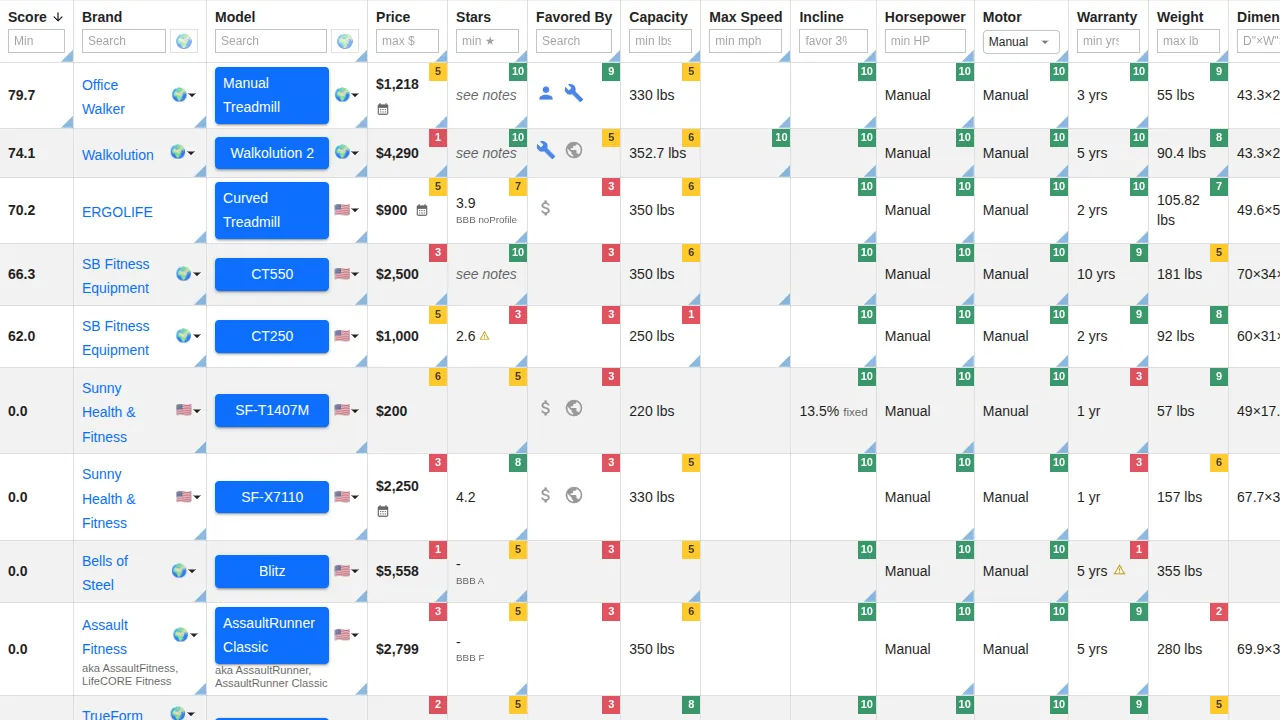
If you just want the list: standing desks that reach 49"+.
If you've been shopping for a walking pad recently, you've probably noticed the new ones are significantly taller than the slim 4-5" walking pads from a couple years ago.
The latest electric walking pads, like the UREVO CyberPad and Vitalwalk Apollo 11 series, now mount the motor underneath the belt instead of in front. No more kicking the motor housing mid-stride, but it bumps the profile to 6-9"+. The CyberPad Home is 8.7" tall. The CyberPad Office is 6.4". The Vitalwalk Apollo 11 Elite is 7.9", the Ultra hits 9.3". The tallest motorized walking pad right now, the CyberPad for Office with auto-incline, reaches 9.4".
Manual walking pads vary more. The Office Walker is only 5.5" where you actually walk (the curved belt's low point) - the 8.3" front edge matters for storage clearance, not desk height. The original Walkolution is 10.6" - the tallest walking surface you can buy. They'll last decades with zero motor maintenance, but they're not flat.
Standing on a 7-8" walking pad in shoes, you're 8-10" taller than normal. Ideally your desk goes up by the same amount, and a lot of popular ones don't.
My setup
- Vitalwalk Apollo 11 Max - walking pad (7.7" tall, under-belt motor)
- FlexiSpot EN1 - standing desk (max 46.5" - too short for this setup, honestly. Due for an upgrade once I switch to the Office Walker)
- HUANUO 17-32" Dual Monitor Stand - tall-pole mount that handles the full sit-to-walk range
Ergonomics basics
Per OSHA's workstation guidelines, proper standing posture means your elbows hang relaxed at your sides, bent at roughly 90 degrees, with forearms parallel to the floor. The desk surface should be at or just below elbow height - the Mayo Clinic and Cornell's ergonomics lab confirm the same fundamentals. For your monitor, the top of the screen should sit at or slightly below eye level, about an arm's length away (~20-28"), so you're looking straight ahead or slightly downward.
Quick rule of thumb: multiply your height in inches by 0.60 for approximate standing desk height. That's conservative - anthropometric data puts standing elbow height closer to 63% of stature - but 0.60 is a safe floor. Then add your walking pad height plus 1-2" for shoes.
So if you're 5'9" (average US male), normal standing desk height is around 41-43". On a 7" walking pad in shoes, ideal surface height is around 49-50". On a 9" walking pad, closer to 51-52". Most budget desks don't reach these heights, though a couple inches short is fine.
Desks that go high enough
Many standing desks top out at 45-48", which gets tight with a taller walking pad. 49-50"+ gives you the most flexibility.
Brands that hit these heights: FlexiSpot (E7 goes to 49.4", E7 Pro to 51.6", E5 Pro to 50"), UPLIFT (V2 Commercial to 50.6", V3 to 48.7"), Vari (ComfortEdge to 50.5"), Branch (up to 52"), Fully Jarvis Extended (to 51.1"), and Desktronic HomePro (to 50.4"). Notable value pick: the Fully Jarvis Extended Range frame is only about $20 more than their standard mid-range frame for those extra inches. For extreme heights, iMovR sells 6" leg extenders for their Lander desk that push the max to 55" - they're the only brand specifically engineering for treadmill-desk setups.
I maintain a comparison table where you can filter standing desks by max height, so you can see which ones actually work for a walking pad setup: standing desks filtered for 49"+ height range. Covers pricing, motor type, weight capacity, stability ratings, warranty, and more across 20+ models.
A tall-pole monitor arm helps a lot
When your desk goes up 8", your monitor should too - otherwise the screen sits well below eye level and you end up looking down all day. Standard gas-spring arms (single elbow joint) often don't have enough vertical range for the sit-to-walk transition.
A tall-pole mount (vertical pole, arm slides up and down) covers the full range easily. Ergotron LX (with the optional tall pole) is the consensus pick on the premium side; Vivo and North Bayou cover budget and pole-style configurations.
I maintain a comparison table of monitor arms filterable by arm style (pole vs articulating), capacity, height range, mechanism, and warranty: monitor arm reviews. Set the Arm Style column to Pole or Hybrid to see the tall-pole picks specifically.
A few more things
Cables need more slack now - the desk travels a bigger range, so use a cable spine or chain.
Stability gets worse the higher a desk goes. Crossbars, wider bases, or 4-leg designs (like the FlexiSpot E7 Plus) help at 49"+, especially with walking vibrations.
Shoes matter more than you'd think. Walking 3-4 hours on a belt is different from standing - good cushioning (or a padded surface like Walkolution offers) saves your joints.
Measure first. Stand on your walking pad (or books at the same height) in walking shoes and measure from the floor to your elbow. That's your target desk height.